System Tray
Opt-in tray icon that shows tokens and dollars saved, opens the dashboard, and alerts you when a new Headroom release is out.
Headroom can show a small icon in your system tray while it runs. It is opt-in and Windows only for now (macOS and Linux are planned).

Install
pip install "headroom-ai[tray]"Use it
Start the proxy with the tray:
headroom proxy --trayOr attach a tray to a proxy that is already running:
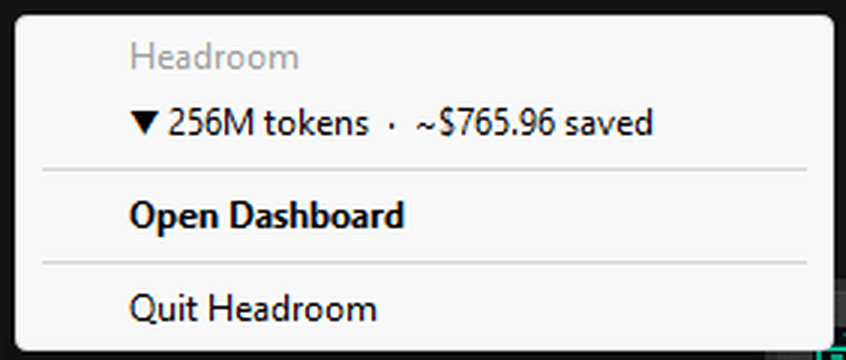
headroom tray --port 8787The icon is the Headroom logomark. Windows hides new icons in the overflow flyout (the ^ arrow by the clock); drag it onto the taskbar to pin it. Right-click it:
| Item | What it does |
|---|---|
▼ 256M tokens · ~$765.96 saved | Lifetime tokens and estimated dollars saved (input compression plus output reduction). Click to open the dashboard. |
| Open Dashboard | Opens /dashboard of the proxy. Also the double-click action. |
| Update available: x.y.z | Appears only when a newer release exists; opens the release page. A one-time notification is also shown. |
| Quit Headroom | With headroom proxy --tray, shuts the proxy down gracefully. With headroom tray, only closes the tray (Exit). |
The icon turns grey while the proxy is unreachable and gets an orange dot when an update is available. Hovering shows the same totals.
Notes
- Stats are polled from the proxy's
/statsendpoint every 5 seconds; nothing leaves your machine. - Update alerts reuse Headroom's existing update check and honour
HEADROOM_UPDATE_CHECK=off. - On unsupported platforms or without the extra,
--trayprints why and the proxy starts normally.
Proxy Server
Run the Headroom proxy to compress LLM traffic for any client — Claude Code, Cursor, OpenAI SDK, or custom apps.
Corporate Networks (Zscaler, Netskope, TLS Inspection)
Run Headroom behind Zscaler, Netskope, Palo Alto, Cisco Secure Access and other TLS-inspecting gateways, and what to ask IT for when something is still blocked.